
How-tos
How to make AI images and videos in ChatGPT with GPT-6.2 Astra
GPT-6.2 Astra landed on 17 November. Here is how to make it render real images and video from a chat, with the price shown before anything is spent.
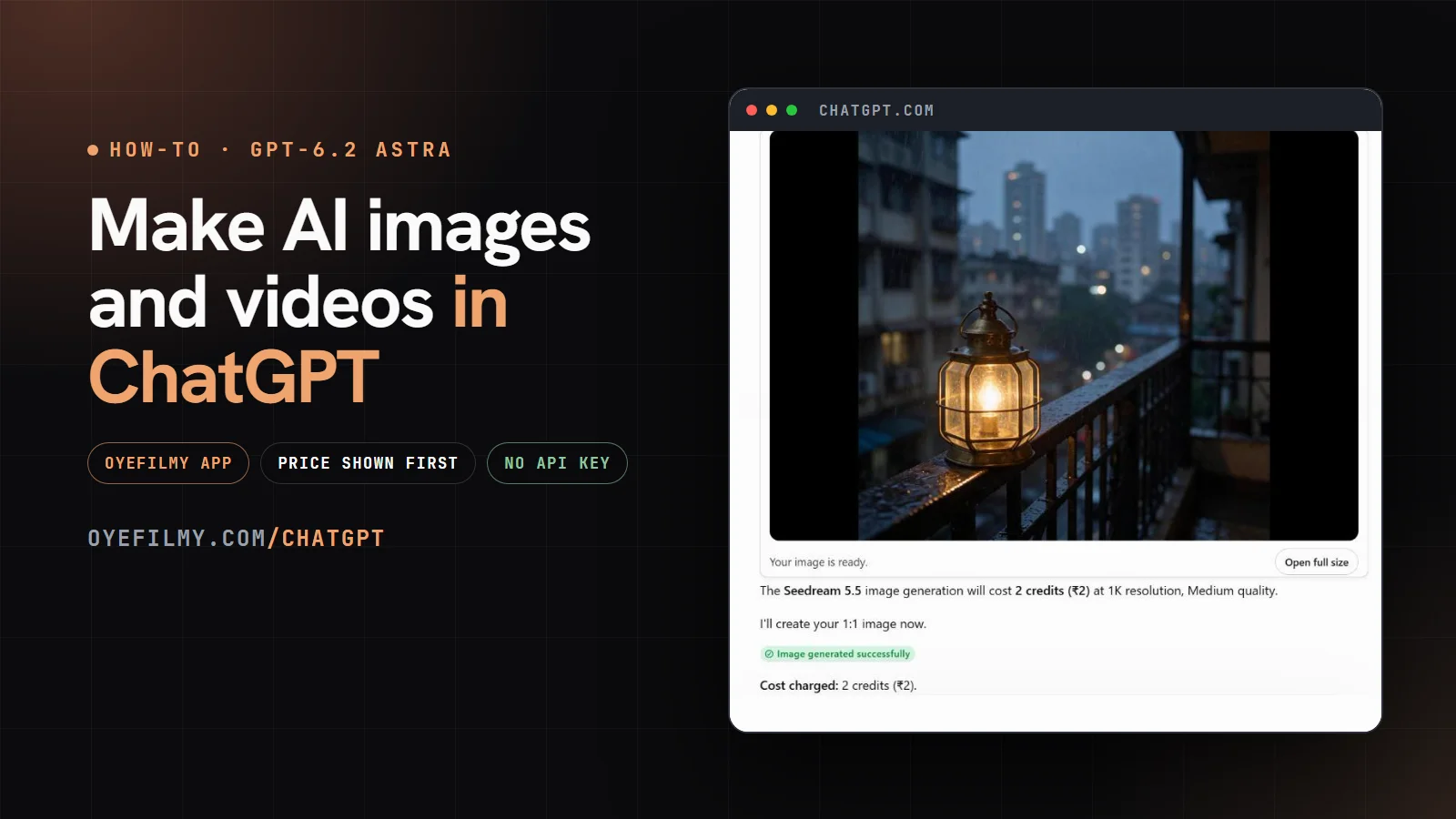
OpenAI released GPT-6.2 Astra on 17 November 2026, for ChatGPT's Plus, Pro, Enterprise and Edu plans and in the API at $8 per million input tokens and $40 per million output tokens. It is a strong planner and writer. What ChatGPT does not have is the video and image models a creator actually renders with. Connect OyeFilmy and it does: the chat writes the prompt, checks the price and calls the model; OyeFilmy renders and stores the result. If you are new to the models themselves, our guide to the AI video generators on OyeFilmy explains which suits which job.
What you need
- A ChatGPT account. We added OyeFilmy from a Free account on 18 November 2026; ChatGPT's Plugins page had the option. Using GPT-6.2 Astra itself needs Plus or higher.
- An OyeFilmy account with credits. Start free at oyefilmy.com, or see pricing.
- Two minutes. No API key, no code. ChatGPT signs in to OyeFilmy with OAuth, the same "Sign in with" step you know from other apps.
Step 1: add OyeFilmy in ChatGPT
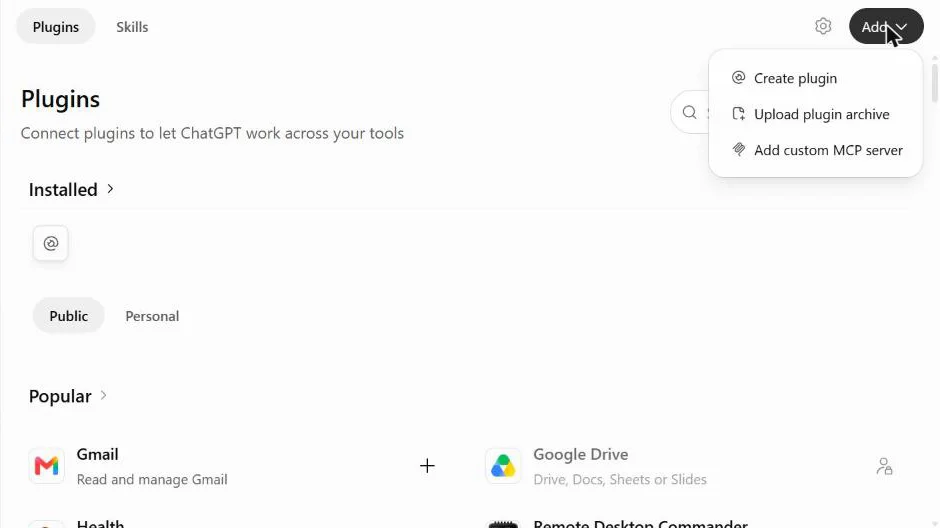
In ChatGPT, click Plugins in the left sidebar. At the top right, click Add and choose Add custom MCP server. (Older guides send you to Settings and a Developer mode switch; that path has moved.)
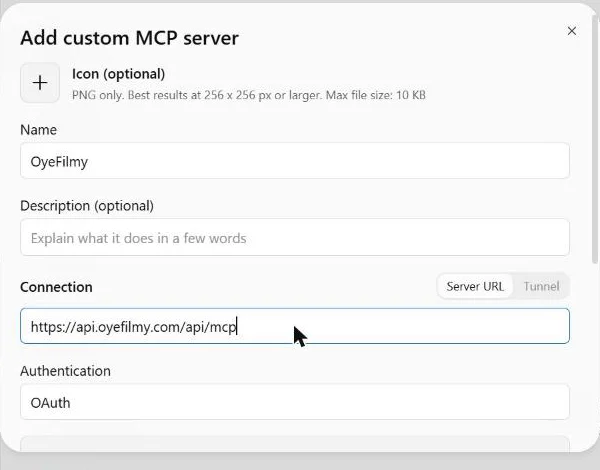
Name it OyeFilmy, paste the server address below, and leave Authentication on OAuth. Tick "I understand and want to continue" and click Create as a plugin.
https://api.oyefilmy.com/api/mcp
Step 2: sign in and allow
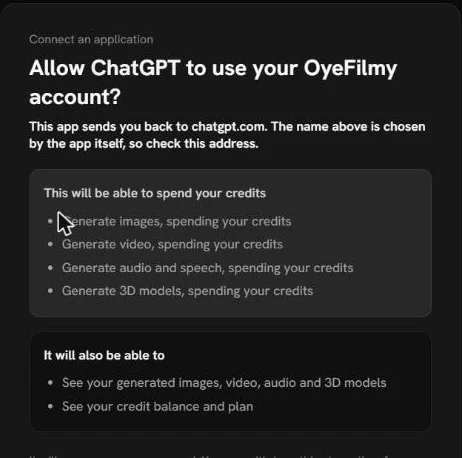
ChatGPT shows Connect OyeFilmy. Click Continue to OyeFilmy, sign in on oyefilmy.com, read what ChatGPT will be able to do and click Allow. ChatGPT can then make images, video, audio and 3D with your credits, see your creations, and see your balance and plan. It cannot change your password, plan or billing, and OyeFilmy keeps only a fingerprint (hash) of the key ChatGPT is given.
Step 3: ask with @OyeFilmy
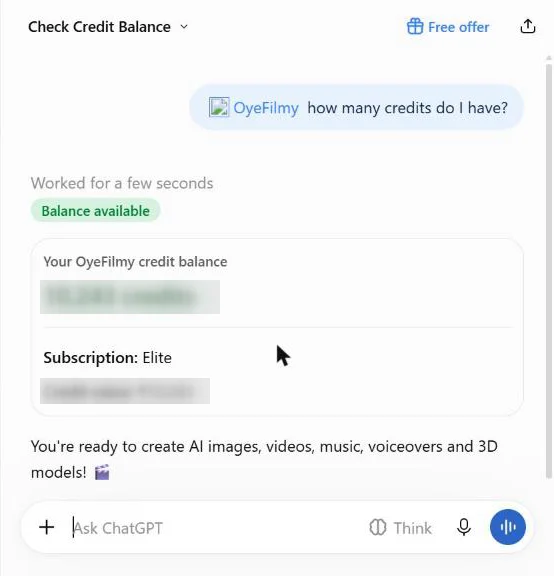
In any chat, type @OyeFilmy and pick the app, then ask in plain words. We started with the cheapest possible question, the credit balance, which ChatGPT answered from OyeFilmy in a few seconds.
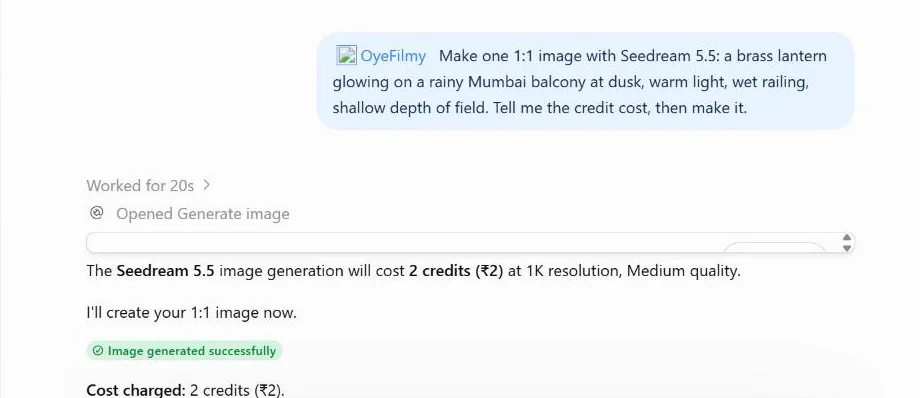
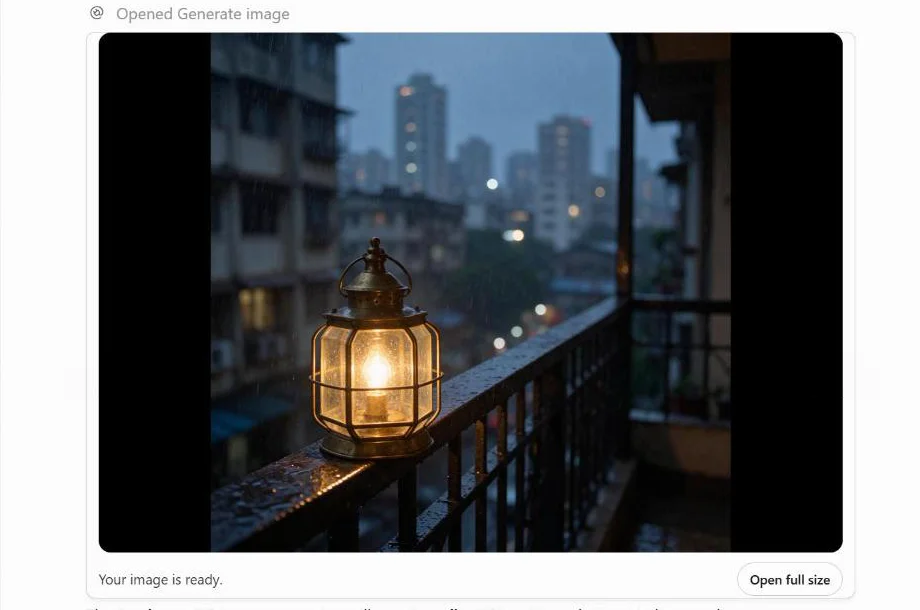
Then an image. We asked for "one 1:1 image with Seedream 5.5: a brass lantern glowing on a rainy Mumbai balcony at dusk, warm light, wet railing, shallow depth of field. Tell me the credit cost, then make it." ChatGPT checked the price with OyeFilmy first, 2 credits for one 1K square image, then made it and showed it in OyeFilmy's own card, right in the chat.
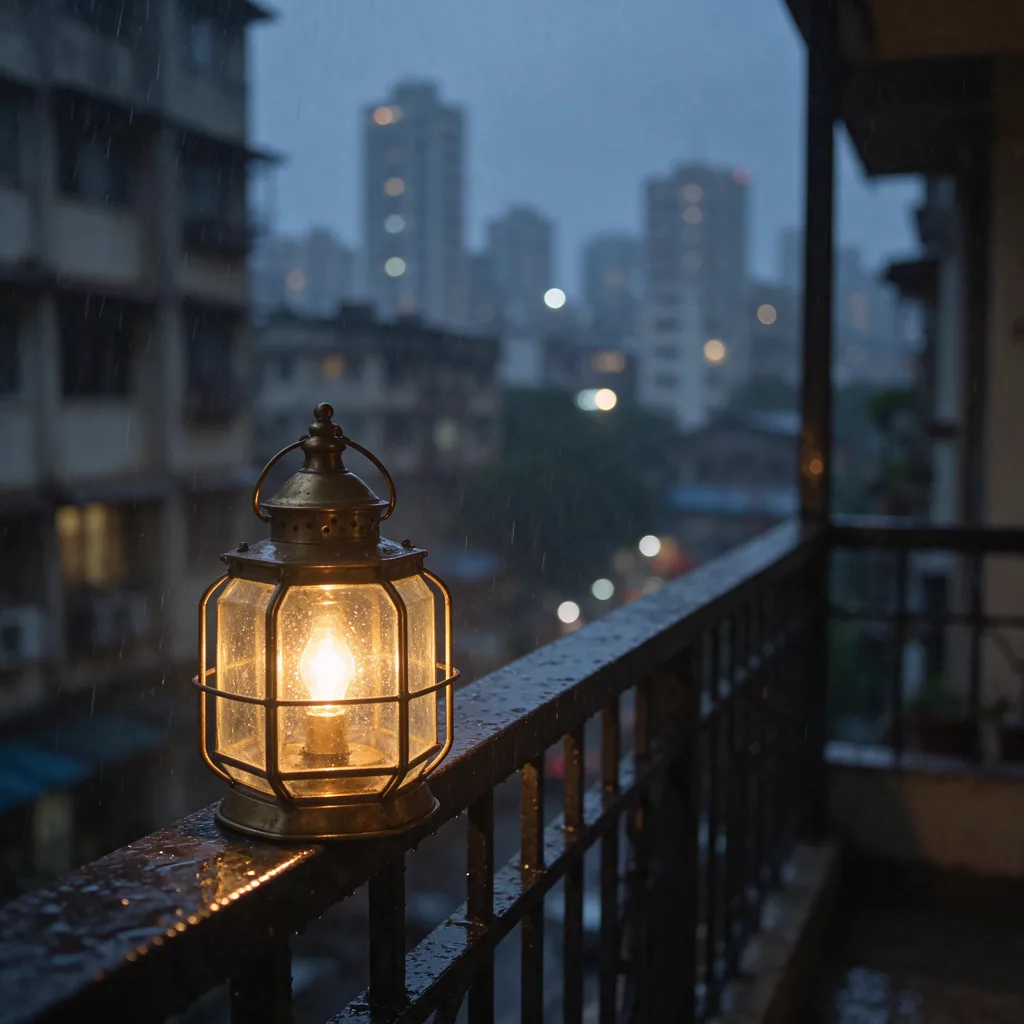
| What we asked | What happened | Credits |
|---|---|---|
| How many credits do I have? | Balance and plan from OyeFilmy, in a few seconds | 0 |
| One Seedream 5.5 image, price first | Quoted, made and shown in OyeFilmy's card in about a minute | 2 |
| Which models can make a 10-second 9:16 reel, and at what price? | Five models priced from OyeFilmy; nothing made until we chose | 0 |
Picking a video model from the chat
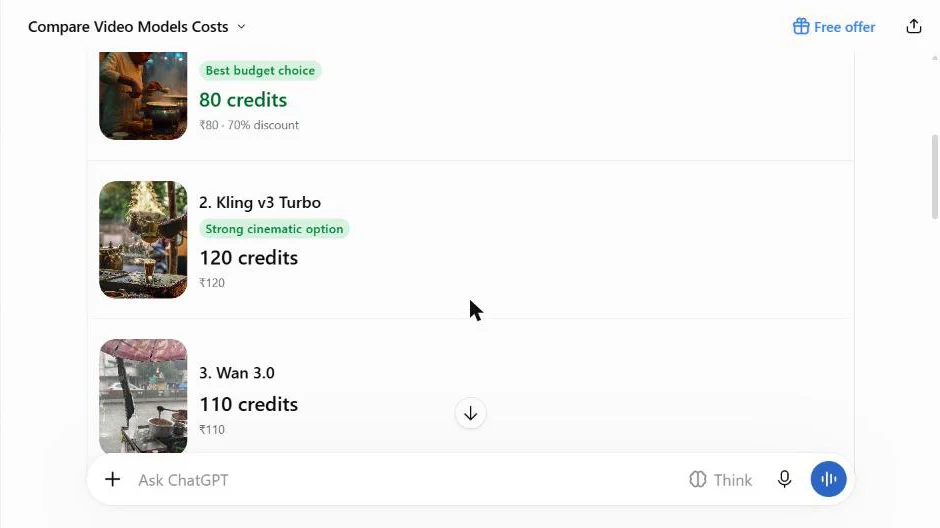
Video costs more than images, so it is worth asking first. We asked which models could make a 10-second 9:16 reel of a chai stall in the rain, and ChatGPT priced five of them through OyeFilmy without spending anything:
| Model | Credits | ChatGPT's note |
|---|---|---|
| Seedance 2.0 Fast | 80 | Best budget choice |
| Wan 3.0 | 110 | — |
| Veo 3.1 Fast | 110 | — |
| Kling v3 Turbo | 120 | Strong cinematic option |
| Seedance 2.0 Reference-to-Video | 190 | Reference control |
For the best-looking results on Seedance 2.5, ask ChatGPT to follow the structure in our Seedance 2.5 prompt guide: subject and action first, then the scene, the look, the camera and the sound. For a product, our product video ad guide shows the shots that work. Everything here is also in the AI video generator in the browser, if you would rather click than chat.
Prompts to try
Paste one into ChatGPT after connecting, or open them ready-filled from OyeFilmy in ChatGPT.
@OyeFilmy Make a vertical video ad for my product: [describe your product]. First a clean studio hero image, then a 5-second 9:16 clip that starts from that image, then a 10-second voice-over line to go under it. Tell me the credit cost before each step.
@OyeFilmy Make a 4:5 poster for [your brand or event] twice: once with Seedream 5.5 and once with GPT Image 2.6. Show me both, then upscale the one I pick.
@OyeFilmy Turn this idea into a 10-second 16:9 cinematic shot on Seedance 2.5 with sound: [your idea]. Write the full prompt first and show it to me, check the cost, then render it.
Wondering which image model to pick for that poster? We put Seedream 5.5 and GPT Image 2.6 through six rounds on one brand; the AI image generator page lists every image model on OyeFilmy.
GPT-6.2 Astra or another ChatGPT model: does it matter?
The ChatGPT model does the thinking: it reads your request, writes the prompt, picks the model and decides when to ask you. OyeFilmy's models do the rendering, and they are the same whichever ChatGPT model you use. A stronger model such as GPT-6.2 Astra helps most with long, multi-step jobs, like planning a three-shot scene or a full ad, where it has to keep a look consistent and keep track of costs.
To be plain about our test: it ran on ChatGPT's Free plan, so on ChatGPT's free model, not on GPT-6.2 Astra. The connection, the tools and the prices are the same on every plan; only the model writing the plan changes.
If something does not work
- "I couldn't access OyeFilmy's action": open ChatGPT Settings → Plugins → OyeFilmy → Refresh tools. If you added OyeFilmy before 18 November 2026, refresh once: ChatGPT keeps the tool list it saw when you connected.
- No OyeFilmy card, or a different picture from yours: refresh tools as above, so ChatGPT loads the current card. The link ChatGPT gives always opens your own file.
- Not enough credits: ask "how many credits do I have?" and top up on pricing.
- To disconnect: ChatGPT Settings → Plugins → OyeFilmy → Uninstall.
- Using Claude, Cursor or Windsurf instead: the same server works there; see the MCP server guide.
Can ChatGPT make videos with GPT-6.2 Astra?
GPT-6.2 Astra writes and plans; it does not render video itself. With OyeFilmy connected, it asks OyeFilmy's video models, such as Seedance 2.5 and Kling, to render, and the clip lands in your OyeFilmy library.
Does it work on the free ChatGPT plan?
We added OyeFilmy and made an image from a Free ChatGPT account on 18 November 2026. GPT-6.2 Astra itself needs Plus, Pro, Enterprise or Edu.
What does it cost to use OyeFilmy from ChatGPT?
Connecting is free. Generations use your OyeFilmy credits at the same prices as the OyeFilmy studio, and ChatGPT is told to quote the price before spending. Our Seedream 5.5 image was 2 credits.
Do I need an API key?
No. ChatGPT signs in to OyeFilmy with OAuth when you click Allow. API keys are only for your own code.
Where do the images and videos go?
Into your OyeFilmy library, the same as anything made on oyefilmy.com, and ChatGPT gives you a link to each file.
Is there an Add to ChatGPT button?
Not yet. Apps in ChatGPT's directory are reviewed by OpenAI; until OyeFilmy is listed, the custom MCP server steps above take about two minutes.
Connect OyeFilmy to ChatGPT
Two minutes, no API key. Ready-made prompts open in ChatGPT with one click.