

How-tos
How to write prompts for AI video: a Seedance 2.5 guide with real examples
The structure that works, how to point at your reference files, the limits that matter, and two real prompts next to the clips they produced.
What Seedance 2.5 reads in a prompt
Seedance 2.5 is ByteDance's video model. On OyeFilmy it comes as text to video, image to video (your picture is the first frame, with an optional last frame) and reference to video (pictures, clips and audio it should keep consistent). Seedance 2.5 Flash has the same three forms and is faster and cheaper. Both are on the AI video generator page; if you are still choosing a model, see our comparison of AI video generators.
A good prompt answers what a camera operator would ask: who, doing what, where, from which angle, sounding like what. "Cinematic" answers none of these. "Low close-up under a parked scooter, a kitten flinching at every bang" answers three.
The structure that works
| Part | What to write | Example |
|---|---|---|
| Subject | Who or what, with the details that must not change | a seven-year-old girl with two oiled braids, in a yellow cotton frock |
| Action | One main action per shot, in order | she kneels, sets the plate down and holds out one finger |
| Scene | Place, time, what is around | an old Mumbai chawl lane at night, paper lanterns and marigolds |
| Camera | Shot size, angle, movement | low close-up; wide; slow push-in |
| Light and look | Light sources, colour, texture | soft golden lantern light, warm film grain |
| Sound | Ambience, effects, music | firecrackers muffled and fading, then a solo bansuri flute |
| Dialogue | The exact words, language named first | she whispers in Hindi, "Darr mat." |
| Shots | Numbered, each with a clear end | Shot 6: she climbs the stairs toward a glowing doorway |
| Keep stable | What must not change or appear | same jacket and sunglasses in every shot; no subtitles |
Two habits matter most. Show emotion: "her eyes fill, she laughs" directs the model; "she is happy" does not. And end every shot on a visible state; a shot with no end tends to drift or cut early.
Two real prompts and the clips they made
Both clips were made on OyeFilmy with Seedance 2.5 for our Diwali shorts. Each prompt is exactly as sent.
Text to video: six shots in 20 seconds
Settings: text to video, 20 seconds, 1080p, 9:16, sound on. Look first, then numbered shots, then sound.
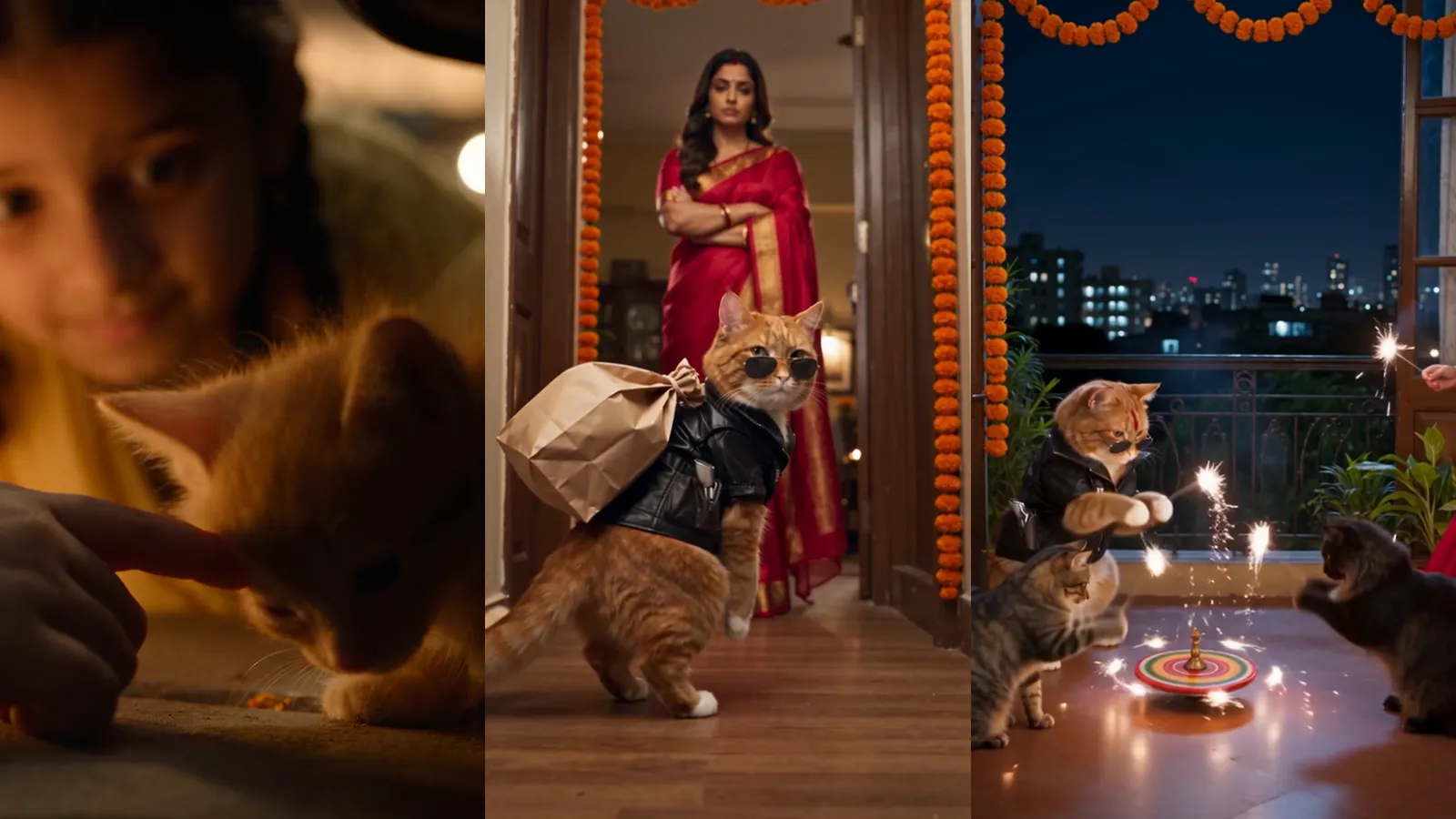
Nostalgic Diwali night in an old Mumbai chawl in 2006, warm film grain, soft golden lantern light, gentle handheld feel. Shot 1: wide, a narrow lane strung with paper lanterns and marigolds, children bursting loud firecrackers, smoke drifting through the light. Shot 2: low close-up under a parked old scooter, a tiny orange kitten trembling, ears flat, flinching at every bang. Shot 3: a seven-year-old Indian girl with two oiled braids, in a yellow cotton frock with small white flowers and a matching small yellow dupatta, carrying a brass plate of lit diyas, stops when she hears a faint meow; she kneels on the stone and sets the plate down. Shot 4: close-up, she slowly holds out one finger; the kitten hesitates, sniffs it, then rubs its head against her hand. Shot 5: she wraps the kitten in her yellow dupatta and hugs it to her chest, cupping its ears with her palm as a rocket bursts above; she whispers in Hindi, "Darr mat. Ab tu ghar pe hai." Shot 6: she climbs the chawl stairs toward a doorway glowing with diyas, where her mother waits smiling. Sound: firecrackers muffled and fading, then a gentle solo bansuri flute melody, soft and emotional.
Every shot is there, in order, and the frock stays the same because the prompt describes it once, in detail. Six shots in 20 seconds is about three seconds each: enough for silent actions.
Reference to video: one picture, one job
Settings: reference to video, 30 seconds, 480p, 9:16, sound on, one picture of the cat as @image1. A photo of the woman's realistic face had been refused as a reference earlier, so she is described in words.
Comedy short, warm cinematic Diwali night, cozy Mumbai apartment, playful tabla-and-sitar music. The orange cat from @image1 is Billu: he always wears his black leather jacket and round dark sunglasses, walks on two legs, expressive and cheeky. Ira is an Indian woman in her late twenties with long dark wavy hair and a small bindi, in a red silk saree with a gold border, warm and bossy like an elder sister. Shot 1, wide: a living room dressed for Diwali, marigold garlands, a glowing row of clay diyas, a puja thali with a small Laxmi idol; Ira arranges the thali and calls over her shoulder in Hindi, "Billu! Pujan ka time ho gaya!" Shot 2, hallway: Billu tiptoes toward the front door, whistling innocently, a paper bag of fireworks hidden behind his back; through the window two scruffy street cats holding sparklers wave at him frantically. Shot 3, doorway: Ira appears with arms folded and says "Kahan?"; Billu freezes mid-step, grins, says "Kahin nahi... bas... bathroom"; the bag slips and rockets, chakris and an anar roll across the floor; he looks down, then up at her and says "Yeh... yeh mere nahi hain." Shot 4, close: Ira points at the thali and says "Pehle Laxmi ji, phir patakhe." Billu drags himself to the puja like a prisoner, tail dragging on the floor, with a long dramatic sigh, while the two cats outside facepalm. Clear Hindi dialogue, comic timing, lively sound effects.
The picture had one job, the cat's look, and he keeps his jacket and sunglasses in every shot. Four shots in 30 seconds left room for dialogue, which needs far more time than silent action.
How to reference images, clips and audio
In the Video Studio, type @ in the prompt to pick an attached file. Pictures are @image1, @image2 and so on, clips @video1, audio @audio1, in the order you add them; a start or end frame counts as an image. A saved character sheet can use its own name as its tag.
Seedance 2.5 takes up to 30 pictures, 10 clips and 10 audio files (clips 2 to 30 seconds, 30 seconds in total); Flash takes 10, 5 and 5.
The rule that matters most is one tag, one job: say what each file provides and what it must not bring in.
@image1 for the woman's face, hairstyle and clothing; do not use its background. @image2 for the tea tin's shape, pattern and label; do not use the hand holding it. The woman from @image1 sits at a wooden table by a sunny window and slowly turns the tin from @image2 toward the camera until the label faces us. Medium close-up, gentle push-in, soft morning light from the left. Sound: a kettle starting to whistle in the next room. No subtitles, no on-screen text.
Never write a range like "@image1-4 are the four friends". The model guesses who is who, and faces can swap mid-shot. For a product video ad from one photo, bind the photo to the product alone.
How OyeFilmy's tools build Seedance 2.5 prompts
For a Long Form storyboard on Seedance 2.5, OyeFilmy can compile each segment's prompt from structured parts. You can copy what the compiler does by hand:
- Labelled sections such as 【Goal】, 【Stage 1】 and 【Sound】, so a long prompt reads as structure.
- Stages with an end. One main event each, ending on a visible state.
- Dialogue in { } with the language named first; music and effects in ( ), so they are not read as things to draw.
- Subtitles stated, because Seedance 2.5 may otherwise burn its own under dialogue.
- A consistency block last: what must stay stable and what must never appear.
【Goal】
A chai seller hands over the last glass of the night.

【Stage 1 — The last glass】
Main event: <seller> pours chai and slides the glass across.
Dialogue language: Hindi. <seller> says warmly: {Aakhri glass, aapke liye.}
Ends: <customer>'s hands close around the glass, steam rising.

【Sound】
Rain on a tin roof, kettle hiss.
(a soft tabla pulse)

【On-screen text】
No subtitles.

【Consistency】
Never: logos, readable signs.
A project's chosen look becomes concrete lens, light, palette, movement and sound language, in one header shared by every segment: up to 1,400 of the 4,000 characters on Seedance 2.5, 700 of 2,200 on 2.0. The model never sees film-makers' names, only the craft in plain words. Do the same: describe lens, light and movement, not whose film it should resemble.
A compiled prompt that runs long is cut by whole sections, never mid-sentence: on-screen text, then sound, then look, then the last stages. Reference bindings and the consistency block are never dropped. Drama Studio uses the same 4,000 and 2,200 limits.
Lengths, sizes and shapes
| Seedance 2.5 | Seedance 2.5 Flash | |
|---|---|---|
| Length | Any whole second, 5 to 30 | Any whole second, 5 to 30 |
| Shape | 16:9, 9:16, 1:1 (image to video follows your frame) | 16:9, 9:16, 1:1 (image to video follows your frame) |
| Size | 480p, 720p, 1080p, 1440p (upscaled from 1080p), 4K | 480p, 720p |
| Sound | Made with the picture | Made with the picture |
| References | 30 pictures, 10 clips, 10 audio files | 10 pictures, 5 clips, 5 audio files |
| Cheap first pass | 480p draft, finished at full quality later | None |
Seedance 2.5 text to video also has a negative prompt box. Test as a 480p draft or on Flash, then render the final size. The Video Studio shows the live price before every run.
Common mistakes
- Too many events in one shot. The model cuts early or blends them. Split them into numbered shots.
- Dialogue with no language. Name it before the line, or the line may come out in the wrong language.
- Unbound or ranged tags. "@image1-4" lets the model decide who is who.
- Text left unstated. Without "No subtitles" you may get captions burned in. Quote on-screen words exactly.
- Re-rendering for a small fix. Live Edit can change a wrong prop in place.
Questions
How long can a Seedance 2.5 prompt be?
OyeFilmy's tools hold Seedance 2.5 prompts to 4,000 characters and Seedance 2.0 prompts to 2,200.
How do I use a reference image in a Seedance prompt?
Attach it in the Video Studio, type @ in the prompt and pick it. Say what it provides, such as a face or a product, and what it must not bring in.
Does Seedance 2.5 make sound?
Yes, Seedance 2.5 and Flash make sound with the picture. Describe ambience, effects and music, and name the language before any dialogue.
How is Seedance 2.5 Flash different?
Flash is faster and cheaper. It renders at 480p or 720p, takes fewer references and has no draft mode. Seedance 2.5 goes up to 4K.
Write your first Seedance 2.5 prompt
Paste a prompt from this guide into the Video Studio, swap in your subject, and draft first.